Video Transcripts for AI Search: Publish Captions, Chapters, and VideoObject Markup
A publishing playbook for turning spoken video into accessible, attributable HTML evidence that search systems and answer engines can retrieve

Rod Stockebrand
Co-founder, Brandleap.ai

Key Takeaways
Short on time? Here are the top things to know.
Article framework
How the key ideas connect
Does adding a video transcript make the video searchable in AI answers?
Should the transcript be a downloadable file or HTML?
Are captions and transcripts interchangeable?
Do chapters create Google key moments automatically?
What makes transcript text useful as a citable source?
A video player is not a transcript strategy
A product demo, interview, webinar, or customer lesson can contain precise answers that never appear in the surrounding page text. A visitor can press play and hear them. A search system or AI retrieval pipeline may instead encounter only a title, thumbnail, embed, and player controls. The evidence exists in the recording, but its spoken form may be difficult to find, scan, quote, and verify.
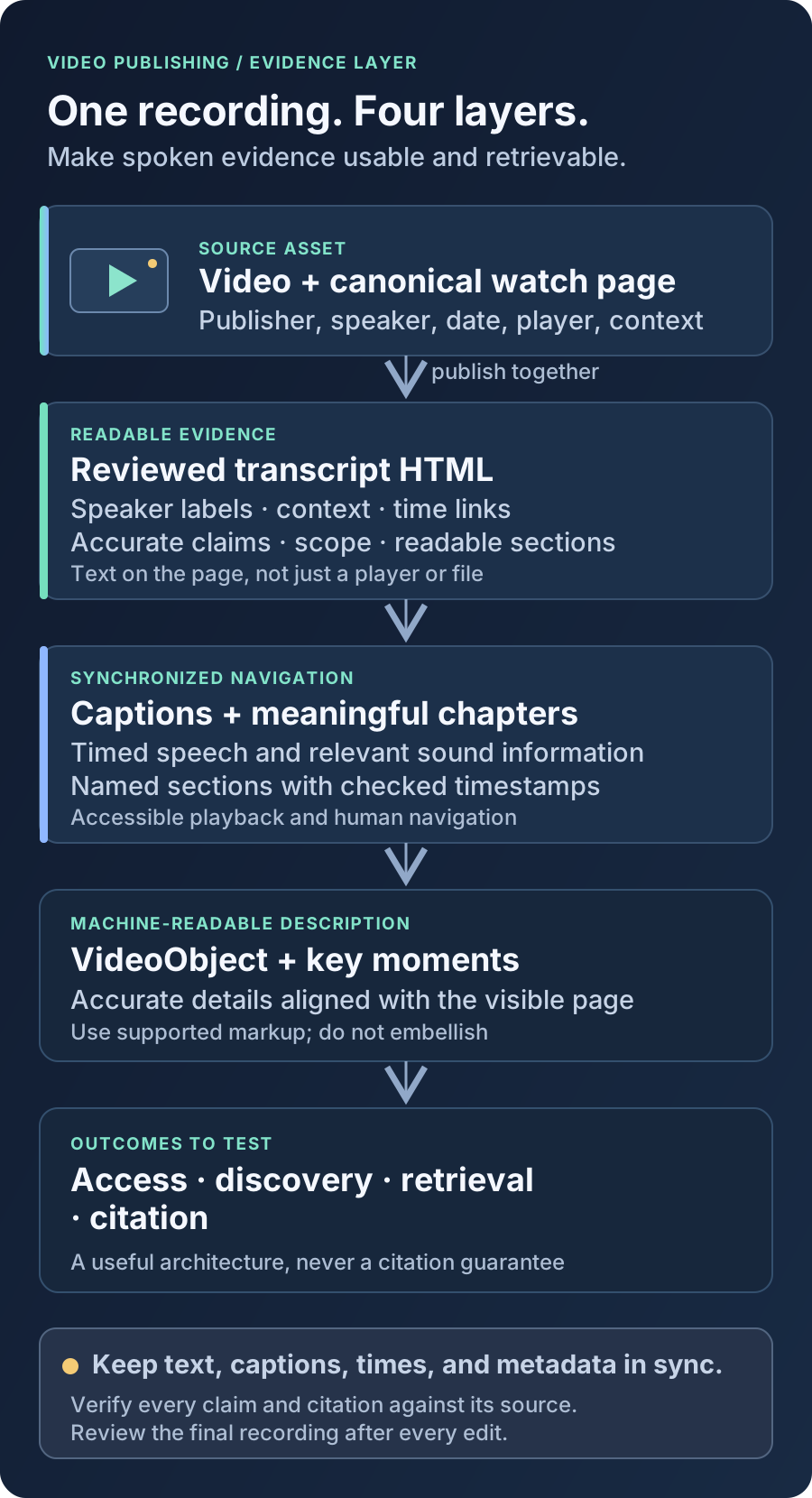
The remedy is not simply “add captions.” Captions, a transcript, chapter navigation, video metadata, and an accessible watch page do different jobs. Together they create a publication layer around the recording: people can follow the audio, read and navigate the content, and search systems can parse what was said and how it relates to the source video. None of these elements guarantees a search feature or AI citation.
Treat the recording as the source asset and the reviewed HTML transcript as its text evidence layer. Keep them connected by one stable page, truthful metadata, and precise time references.
Separate discovery, accessibility, and retrieval
Discovery asks whether a system can identify the video and its public watch page. Accessibility asks whether people with different sensory, cognitive, or interaction needs can use the recording. Retrieval asks whether relevant spoken passages are available in a form a search system can match to a question. A transcript improves the text layer, but it does not substitute for a crawlable page, functioning player, captions, or a clear source.
Google’s video documentation focuses on how videos can be discovered and understood in Search, including the role of a dedicated watch page and accurate video information. Schema.org’s VideoObject vocabulary can describe a video, but adding metadata is not a substitute for visible, accurate content. The page should make sense to a visitor before any markup is considered.
Build the canonical video page in HTML
Give a significant recording a stable page with a descriptive title, a short explanation of what it covers, an embedded or hosted playable video, its publication date, publisher or speaker, and a readable transcript. Place the transcript in the page’s HTML rather than relying on text that appears only after a script runs, in a private platform interface, or inside an image. A native disclosure can help manage a long transcript if its label and content remain accessible and usable without a fragile interaction.
The transcript should add evidence, not merely repeat promotional copy. Preserve the substance of the speech and enough surrounding context to interpret it. Identify speakers consistently, include relevant sound cues where needed, and distinguish a spoken claim from on-screen text or editorial notes. Correct obvious recognition errors, product names, numbers, acronyms, and punctuation against the recording. An automated transcript is a draft, not a reviewed source.
A transcript page versus a player-only page
✗ Un-optimized
“Watch our webinar on customer onboarding.” The player is embedded, but no searchable text or route to its answers is provided.
✓ Triple-rich rewrite
“In this webinar, product lead Maya Chen explains the onboarding sequence and its limits.” The page includes a reviewed transcript with speaker labels, linked time markers, captions, chapters, and video details.
- Use one canonical, indexable URL for the video page and link to it from relevant topic pages.
- Put the core description and useful transcript text in ordinary HTML, not exclusively in a platform player or downloadable file.
- Name speakers and clarify when a transcript is edited for readability rather than verbatim.
- Mark meaningful demonstrations, quotations, and claims with nearby context and time references.
- Keep the page available when the embedded player is blocked or unavailable; do not let the transcript disappear with a third-party script.
Captions and transcripts are related, not interchangeable
Captions are timed text associated with the media. For accessibility, prerecorded captions need to convey speech and relevant sounds, not just provide a rough dump of recognized words. A transcript is a document a reader can scan at their own pace. A transcript may use headings, speaker names, and links to important moments; captions must synchronize with the audio as it plays. Publishing one does not automatically provide the other experience.
W3C’s WCAG guidance explains the prerecorded-caption success criterion and its relationship to synchronized media. WebVTT defines a format for timed text tracks. These are useful technical references, but a file passing a parser is not proof that the captions are complete or understandable. Check timing, line breaks, speaker identification, sound cues, and the player’s caption controls with people and assistive technology where appropriate.
<video controls preload="metadata" poster="/media/onboarding-poster.jpg">
  <source src="/media/onboarding-demo.mp4" type="video/mp4">
  <track
    kind="captions"
    src="/media/onboarding-demo.en.vtt"
    srclang="en"
    label="English"
    default>
</video>
<p><a href="#transcript">Read the transcript</a></p>
This is a pattern, not a universal embed recipe: use the player and media source that fit the site, and verify that the caption track actually loads. Label the language accurately. If the recording has multiple languages, provide the available tracks and identify the transcript language. Avoid claiming a transcript is verbatim when it has been condensed, and do not use captions to silently alter the meaning of what a speaker said.
Make chapters navigable and meaningful
Chapters divide a recording into named sections. They help a person jump to “How the handoff works” instead of scrubbing through an hour-long timeline. On the page, use a short list of timestamp links whose labels describe the actual section. Each link should seek the player to the corresponding point, and each label should remain understandable when read out of context.
- Use chapter titles that state the subject or question, rather than generic labels such as “Part 2.”
- Check every timestamp against the final encoded video; edits and inserted slates can shift timecodes.
- Keep chapter boundaries useful but do not split one answer in a way that removes its question or qualification.
- Provide a usable text navigation list even if the player also displays its own chapter interface.
- For a short clip, do not invent chapters just to add metadata; the labels should improve real navigation.
Chapters can support key-moment presentation, but they are not a promise that a search result will show moments. Google documents structured data options such as Clip, which defines a segment and its start time, and SeekToAction, which describes a player’s timestamp-seeking URL pattern. Follow the current requirements, use a supported implementation, and verify that the visible chapters, target times, and markup all agree. Search engines decide whether and how to display such features.
Use VideoObject to describe, not embellish
VideoObject properties can express facts such as a video’s name, description, thumbnail, upload date, duration, and content URL. Use values that match the page and the actual asset. A structured-data description should not claim broader coverage than the recording, and a thumbnail URL should be stable and accessible to crawlers. Google’s supported-property documentation is more specific than the general Schema.org vocabulary; use it as the source of truth for Google eligibility.
{
  "@context": "https://schema.org",
  "@type": "VideoObject",
  "name": "How the product handoff works",
  "description": "A product lead demonstrates the handoff workflow and its limitations.",
  "thumbnailUrl": "https://example.com/media/handoff-poster.jpg",
  "uploadDate": "2026-09-28T00:00:00Z",
  "duration": "PT8M42S",
  "transcript": "A reviewed transcript matching the video on this page."
}
The values above are illustrative property names, not a production record: replace every example with verified facts, and only use transcript markup if the content is genuinely available and consistent. Structured data helps machines interpret declared facts; it does not make absent transcript text accessible to visitors or cause an answer engine to trust unsupported claims. Validate markup and check it against the rendered page after publishing.
Preserve source context for retrieval and citation
Retrieval systems work with chunks of text, and a transcript fragment can be misleading when separated from the question, speaker, or scope around it. Put question-and-answer pairs together where practical. Retain units, qualifiers, dates, and product or version context. Use timestamps that return to the canonical page and seek to the relevant moment; do not depend on a platform-specific transcript URL as the only way to locate evidence.
A useful transcript can also be wrong in durable ways. A misheard figure, name, negation, or technical term may be repeated as a confident claim. Establish an editorial review owner; check quotations and sensitive or consequential claims against the recording; preserve an update date; and correct the page if the video is replaced or edited. If a transcript is adapted for readability, identify the treatment and preserve meaning.
Keep the claim attached to its evidence
✗ Un-optimized
Transcript fragment: “It increased by twelve.” No speaker, baseline, unit, period, or surrounding question.
✓ Triple-rich rewrite
“Asked about the pilot’s completion rate, the presenter says it rose by 12 percentage points between the named periods; the recording does not attribute the change to one intervention.” Link to the matching timestamp and explain any editorial additions.
A publishing and quality-assurance workflow
- Choose a useful recording and confirm publication rights for the video, transcript, captions, names, and any quoted material.
- Generate a transcript draft, then review it against the recording for names, terminology, numbers, speaker turns, and meaningful audio cues.
- Create or correct synchronized caption files; test them in the real player with captions turned on and off.
- Draft chapters from the final edit, test each time link, and preserve the context around important claims.
- Publish the transcript, player, visible video details, and accurate structured data together on a stable watch page.
- Test the page without a logged-in session and with scripts limited; check the HTML response, caption track, keyboard controls, and mobile reading experience.
- Sample representative questions, inspect the passages an ordinary search can retrieve, and verify any resulting citation against the video and transcript.
- When the recording changes, update the transcript, captions, timestamps, metadata, and revision information as one editorial change.
Measure quality, not a promise of AI visibility
Track whether the page is discoverable and fetchable, whether the transcript is present in the HTML visitors receive, whether captions work, and whether chapter links land at the intended points. Then test a set of real questions and inspect the returned passages and citations. Record failures precisely: missing page, inaccessible media, transcript mismatch, weak passage context, or citation that does not support the answer.
Do not interpret the presence of VideoObject, a transcript, or an indexed page as evidence that AI systems will use the recording. Retrieval and citation vary by product, query, source access, and system behavior. The defensible outcome is a video publication that people can use and that exposes accurate, well-sourced text evidence to systems capable of retrieving it.
A transcript is not a shortcut around search. It is a second, inspectable representation of the recording—one that should be accurate for readers, synchronized for viewers, and carefully attributed when it becomes evidence.